




What Is a VPN? A Plain-Language Explanation

What is a VPN, in one line: it connects your device to a middle node first, then reaches other sites through it, so those sites see the node's address instead of yours. This covers what it actually does, where it shows up day to day, and what it can't fix.



A VPN is a technology that connects your device to a middle node first, then reaches other sites through it — once connected, other sites and any network along the way see the node's address, not your own network's actual address. That middle node is typically run by a VPN provider, sits in one of several regions, and which one you connect to is up to you.
Plenty of people know they're "supposed to use a VPN" without being able to say what it actually does, and that's understandable — most introductions jump straight into protocols and encryption algorithms, and for anyone who doesn't need the technical detail, those words get in the way of understanding rather than helping it. This skips all of that: first a rough mental picture, then exactly what it does, then where its reach stops — knowing that boundary turns out to be more useful day to day than memorizing a definition.
Start with an analogy
Picture mailing a package the normal way, straight from your house — the courier and the recipient both know it came from your address. A VPN is like sending that package to a relay point first: the relay slaps its own address label on it and forwards it to the final recipient — the recipient sees the relay's address, not yours, with the relay now sitting between the two of you.
In networking terms, that "relay point" is the node your VPN connects to. Your device establishes a connection to the node first, and every request headed to another site after that gets routed through it — the site sees the node's address, and there's no longer a direct conversation between you and the site. The analogy isn't meant to be exact, but it's enough to build a roughly correct picture — the relay isn't the destination, just one more hop along the way, and it doesn't open the letter to read what's inside either.
What a VPN actually does
Broken down more precisely: a VPN is software installed on a device that, once connected, encrypts the content on the leg between the device and the node, so sites and any network along the way see the node's outbound address instead of the device's own. That layer matters most on a public Wi-Fi network anyone can join, since other devices on the same network could otherwise catch unencrypted traffic — the basics of VPN encryption covers what encryption actually blocks and what it doesn't.
Flip the picture around and it gets more intuitive: without a VPN, your ISP sits between you and the entire internet; with one, a VPN node takes that position instead, and the ISP falls back to a spot where it can only tell that you connected to a VPN — not which site you actually reached.
Exactly how a packet travels from the device to the node and on to the destination isn't the focus here — how a VPN actually works walks through that path in order, including DNS and the IP change, two things people often mix up. The point of this page is to get "what a VPN is and what problem it solves" fully settled first, rather than diving into the mechanics right away; reading both together fills in more of the picture than either one alone. Once the connection is up, day-to-day use barely registers the extra hop — switching sites and opening apps looks about the same as it would without a VPN, and most of the time the only visible sign is a status icon flipping from "not connected" to "connected."
Where it shows up in everyday use
The most common case is a site or app that won't open — the cause might be a network-level restriction, or it might be the site's own region-based decision, and a VPN only fixes the first kind. The second common case is privacy on a public network: airport and café hotspots anyone can join, where other devices on the same network could in theory catch unencrypted traffic. Add a VPN and what they'd see instead is a stretch of unreadable data, no different from static.
The third case is keeping a connection steady while traveling — a new city or a new country means the services you're used to may not connect the same way, and an account can sometimes get flagged for an extra check when the login location suddenly changes. Staying on one VPN node helps sidestep a lot of that friction; account security before and after you travel covers exactly what to watch for in that situation. A fourth case is simply a route that isn't performing well at a given moment — some routes get congested at certain hours, and switching nodes tends to show results faster than retrying the same one repeatedly. Together, these four cover most of the real reasons people first wonder whether they need a VPN at all — and a rough way to judge whether a given problem is even a VPN's to fix: if the symptom doesn't match any of the four, switching nodes probably won't help.
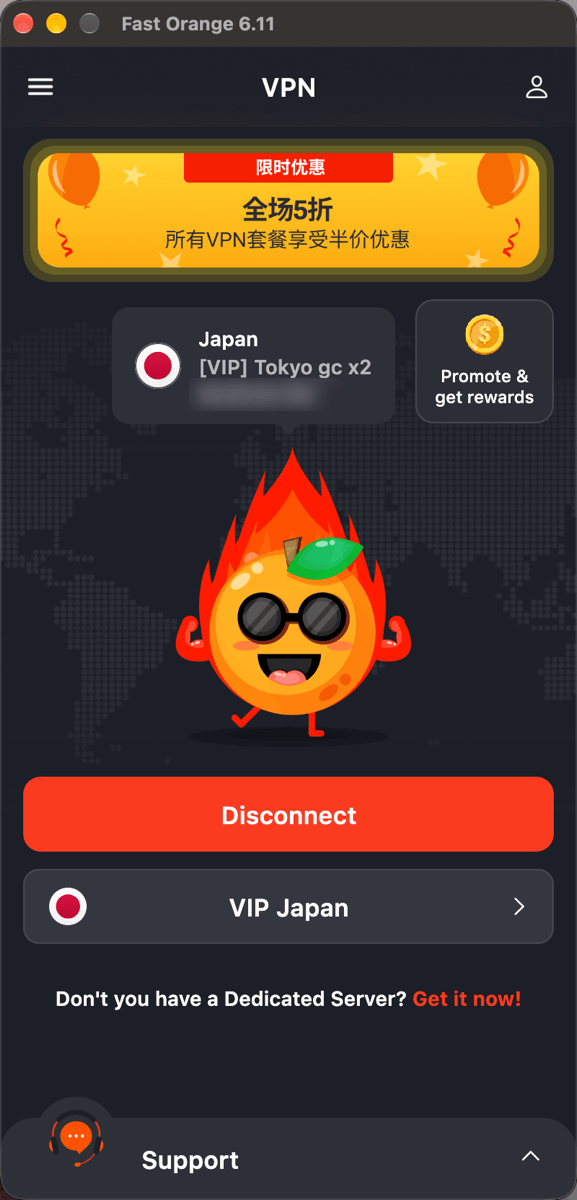
What the four have in common is that the connection either works or it does not, and the client is where that becomes visible: Fast Orange VPN's desktop app names the country, the node and the address in use once the tunnel is up. Assuming a VPN is on and confirming it are two different things.
Where a VPN can't help
What a VPN can improve is the connection itself; an account's own regional restrictions and an app's own bugs are outside what it touches. If an app decides your account was registered outside some region and limits a feature accordingly, that's a rule enforced at the account level, and no number of node switches changes the rule itself — this comes up again and again across specific apps.
The same goes for a bug in the app itself, or a problem on its servers — neither is something a VPN can fix. A stable connection and "does the app actually work" are two separate questions, and treating them as one tends to pin unrelated problems on the VPN — and after switching several nodes with no change, it's easy to wrongly conclude the network tool itself just isn't good enough, which gets in the way of the troubleshooting that would actually help, like contacting that app's support. The test is simple: if the problem persists after switching nodes, and other sites and apps are working fine, it's almost certainly not the VPN's layer — and continuing to switch nodes from there just wastes time better spent looking somewhere else.
Terms worth not confusing this with
- A proxy — typically handles only the traffic you point at it, usually without encryption, and covers less ground than a VPN. A VPN generally works at the whole-device level, covering most of what a device sends, without configuring every app individually.
- Incognito/private browsing mode — only keeps this one device from storing local history and cookies. Sites and your network provider can still see what you visited, which is an entirely different problem from what a VPN addresses — the two can even run at the same time without conflicting, since one handles local records and the other handles the network layer.
- Casual stand-ins like "airport" or "ladder" services — often used interchangeably with VPN in Chinese-language communities, and they do something similar in spirit, but the products and how they're run differ quite a bit. Worth judging as two separate categories of product rather than swapping the words freely.
A fuller product comparison lives on the comparison page — sorting out these terms first makes that comparison easier to follow, and harder to get talked past.
In summary
What a VPN does comes down to one line: it routes a device through a node before it reaches other sites, so the site sees the node's address, and the content on that first leg is encrypted. What it can improve is the network side; account rules and problems inside an app are outside what it can touch, and knowing where that line sits is more useful day to day than memorizing the definition — when something won't load, it's worth asking which layer the problem actually lives in before switching through ten nodes looking for a fix.
For exactly how the data travels that path, the article mentioned earlier walks through it in order, including DNS and the IP change that trips people up. FastOrange connects in one tap with nothing to configure by hand, and comes in useful across the sites-that-won't-open, public-network, and travel cases covered above. Every registered account gets free trial time each day — signing up takes a few steps, and using it says more, faster, than reading ten more definitions would.


 High speed
 Millions of users
 24/7 Support
Get the Fast Orange App
One App. Every Platform. A More Stable Connection.
Available for Windows, macOS, Android, and iOS. Use One Account Across All Your Devices and Start with a Free Trial.
High speedMillions of users24/7 SupportDownload Fast Orange
 Choose your platform
Download Fast Orange
Switch between Windows, Android, iOS, and macOS




